Application settings
The application settings dialogue allows you to configure various aspects of Crossword Wrangler, including general preferences, appearance, and word list configuration. You can access the settings dialogue by clicking the gear icon in the Library Browser.
General preferences
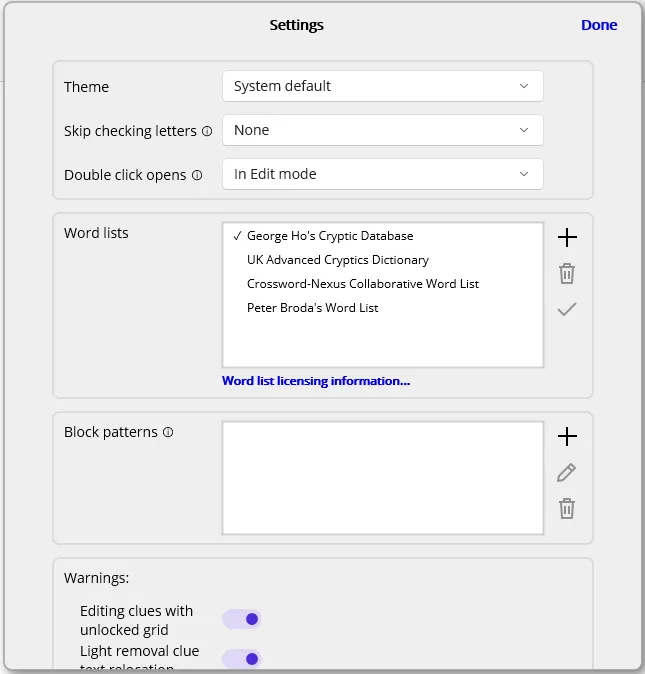
Section titled “General preferences”- Theme: Choose between Light theme and Dark theme to control how the application appears. When set to System Default, the theme will be determined by the Windows system settings.
- Skip checking letters: This selection affects how answers are entered into the crossword grid. When enabled, Crossword Wrangler will jump over cells that already have letters in them, allowing for faster input when filling in answers. Otherwise, it will progress to the next cell sequentially, regardless of whether it already contains a letter.
- Double click opens: This setting determines the default action taken when you double click or press Return on a crossword in the Library Browser. You can choose to open the crossword in the Edit Page for editing, or in the Solve Page for solving.
Word lists
Section titled “Word lists”Several tools in the Edit Page and Solve Page make use of word lists: specifically the word, auto-fill and anagram helper tools. Which word list you prefer depends on factors such as language or variant that you are targeting and the level of obscurity you prefer. Current options are:
- George Ho’s Cryptic Database: George Ho’s Dataset of Cryptic Crossword Clues is an dynamically updated collection of cryptic crossword clues, providing a rich resource for constructing and solving cryptic crosswords. Crossword Wrangler uses a snapshot of only the answers from the dataset (as of September 2026), augmented using word frequency information from the British National Corpus. This provides a scored list of words and phrases that have been observed in actual cryptic crossword clue solutions.
- The UK Advanced Cryptics Dictionary: A word list created by Ross Beresford and used by his Tea and Sympathy crossword solving and setting packages, sadly now discontinued. It remains a valuable resource for those interested in more advanced UK-style cryptic crosswords (such as the Listener Crossword), featuring a wider range of more obscure words and phrases that may be encountered in such puzzles. Crossword Wrangler uses version 18 of the dictionary, and as with George Ho’s dataset, it is augmented using word frequency information from the British National Corpus.
- The Broda word list: Created by Peter Broda, with significant contributions from Mark Diehl and Joe Krozel, it is a scored list that is suited to US English and crosswords. For more details see The Broda Word List.
- Crossword-Nexus Collaborative Word List a community-driven word list maintained by Crossword-Nexus, providing words suitable for various types of crosswords. Also tends towards US English and crosswords. For more details see Crossword-Nexus Collaborative Word List.
Aside from some scoring information, none of these words lists are my work. I am grateful to the creators and maintainers of these resources for making them available to the crossword community. Licencing information for them can be viewed using the link on the word list section.
Block patterns
Section titled “Block patterns”It is not uncommon for word lists to contain answers that some setters may prefer to avoid, due to obscurity or personal preference. Block patterns use the same syntax as the word search tool (including individual literal words). They apply to whichever word list is currently selected, and exclude any words that match the specified patterns.
Block patterns can be added, edited, or removed through the settings interface, allowing users to customize which words are excluded from the currently selected word list.
To avoid performance issues when loading Crossword Wrangler and accidentally over-blocking a large number of words, block patterns that match more than 100 entries in the currently selected word list will not be added.
Warnings
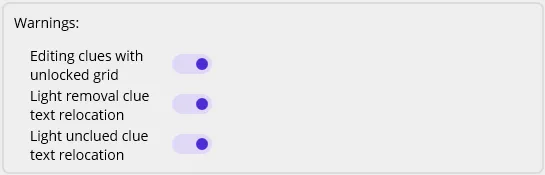
Section titled “Warnings”Crossword Wrangler will, on occasion, display warning or informational alerts to notify users of potential issues while creating and editing crosswords, while offering the ability to hide such warnings in the future. Warnings that have been hidden in this way can be reinstated through the settings interface.